Introduction to WebACL
Web Access Control for the decentralized web
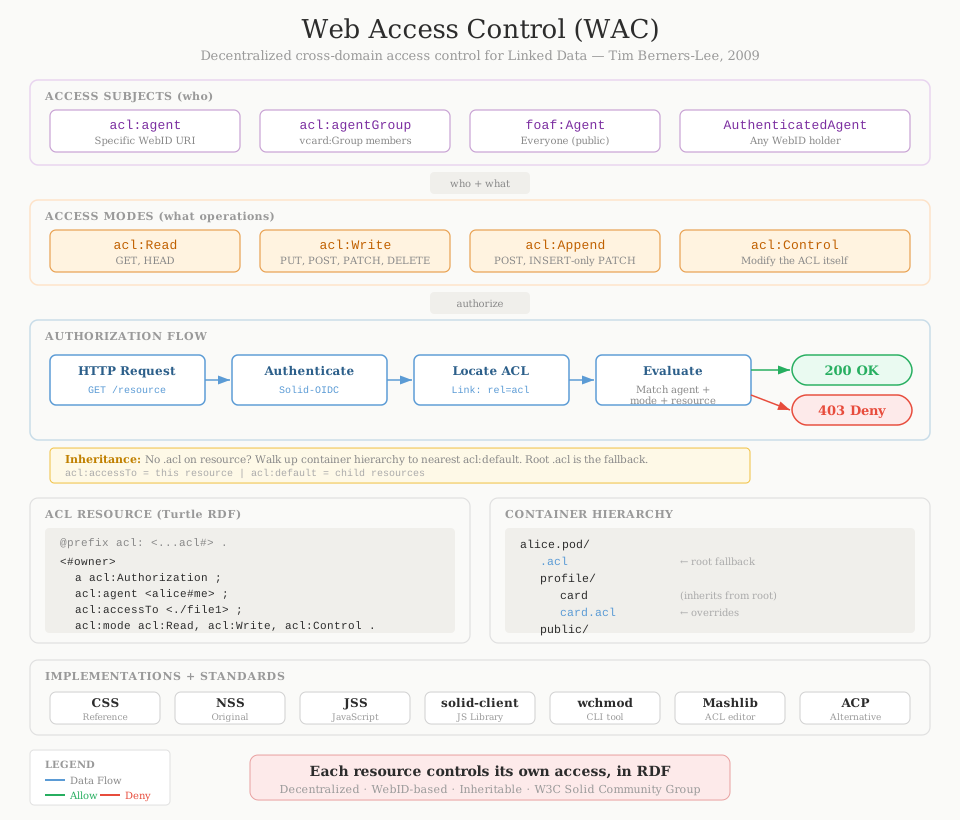
What is WebACL?
Web Access Control (WAC) is a decentralized authorization system for the web. It lets you control who can read, write, and manage your data using simple rules written in RDF — the same language the web uses for linked data.
Think of it as chmod for Linked Data. Just as Unix file permissions control access to files on a server, WAC controls access to resources on the web. But unlike Unix permissions, WAC works across domains, uses URIs to identify people, and expresses rules that both humans and machines can understand.
WAC was designed by Tim Berners-Lee in 2009 as part of the Solid project — a vision for a web where people control their own data. It is the primary authorization mechanism in the Solid Protocol.
The Core Idea
Every resource on a Solid server can have an associated ACL file — a small RDF document that says who can do what. The ACL file is discovered via an HTTP Link header:
Link: <https://alice.pod/docs/file1.acl>; rel="acl"The server checks this ACL file on every request. If there's a matching authorization for the requesting agent, access is granted. If not, access is denied. It's that simple.
How It Works
- A client requests a resource (e.g.,
GET /docs/file1) - The server authenticates the agent (via Solid-OIDC or WebID-TLS)
- The server locates the effective ACL — the resource's own
.aclfile, or the nearest ancestor container's ACL - The server checks if any authorization matches the agent, access mode, and resource
- If a match is found, access is granted. Otherwise, denied.
The key concept is the effective ACL. If a resource doesn't have its own .acl file, the server walks up the container hierarchy until it finds one. This means you can set a single ACL on a folder and have it apply to everything inside — just like default permissions in a filesystem.
Writing an ACL File
An ACL file is an RDF document. Each authorization has four parts: a type, an access subject (who), an access mode (what), and an access target (which resource).
Turtle format
@prefix acl: <http://www.w3.org/ns/auth/acl#> .
@prefix foaf: <http://xmlns.com/foaf/0.1/> .

# Owner has full access
<#owner>
    a acl:Authorization;
    acl:agent <https://alice.pod/profile/card#me>;
    acl:accessTo <./file1>;
    acl:mode acl:Read, acl:Write, acl:Control.

# Public can read
<#public>
    a acl:Authorization;
    acl:agentClass foaf:Agent;
    acl:accessTo <./file1>;
    acl:mode acl:Read.
This says: Alice has full control over file1, and anyone on the web can read it.
JSON-LD format
Since ACL files are RDF, they can also be written in JSON-LD — making them accessible to web developers who work with JSON:
[
  {
    "@context": { "acl": "http://www.w3.org/ns/auth/acl#" },
    "@id": "#owner",
    "@type": "acl:Authorization",
    "acl:agent": { "@id": "https://alice.pod/profile/card#me" },
    "acl:accessTo": { "@id": "./file1" },
    "acl:mode": [
      { "@id": "acl:Read" },
      { "@id": "acl:Write" },
      { "@id": "acl:Control" }
    ]
  }
]
Access Modes
WAC defines four access modes:
View resource contents. Maps to HTTP GET, HEAD.
Create, modify, delete. Maps to PUT, POST, PATCH, DELETE.
Add data without removing existing data. Maps to POST.
Read and modify the ACL itself. The meta-permission.
Access Subjects
WAC identifies agents by their WebID — a URI that resolves to a profile document. You can grant access to:
| Predicate | Grants access to |
|---|---|
acl:agent | A specific person, identified by WebID |
acl:agentGroup | Members of a group (a vcard:Group document) |
acl:agentClass foaf:Agent | Everyone — public access, no authentication needed |
acl:agentClass acl:AuthenticatedAgent | Any authenticated user with a WebID |
acl:origin | Requests from a specific web application origin |
Inheritance
WAC supports permission inheritance through containers. Using acl:default instead of acl:accessTo, you can set permissions that apply to everything inside a container:
<#default>
    a acl:Authorization;
    acl:agent <https://alice.pod/profile/card#me>;
    acl:default <./documents/>;
    acl:mode acl:Read, acl:Write, acl:Control.
This grants Alice full access to everything in /documents/ and all its sub-containers — unless a more specific ACL overrides it.
Why WebACL?
WAC has several properties that make it well-suited for the decentralized web:
- Decentralized — no central authority. Anyone can run a server with WAC.
- Cross-domain — Alice on one server can grant access to Bob on another.
- Standards-based — built on RDF, HTTP, and WebID. No proprietary formats.
- Human-readable — ACL files are plain text. You can read and edit them directly.
- Machine-readable — ACL files are RDF. Applications can reason about permissions programmatically.
- Cascading — set permissions once on a container, inherit everywhere inside.
Getting Started
To start using WebACL:
- Get a Solid pod from a provider like solidcommunity.net or solidweb.org
- Browse to a resource and find its
.aclfile (check theLinkheader) - Edit the ACL file to add or change permissions
- Or use a Solid app like SolidOS that manages permissions through a UI
For server implementers, the full specification is at webacl.org.
Implementations
| Server | Language | WAC Support |
|---|---|---|
| Node Solid Server (NSS) | JavaScript | WAC 1.0 |
| Community Solid Server (CSS) | TypeScript | WAC 1.0 + ACP |
| JavaScript Solid Server (JSS) | JavaScript | WAC 1.0 |
| Pivot | TypeScript | WAC 1.0 |